Before asking the machine to change energy or polarization, close the "Photon shutter" in the front end

In the Athos Main panel click on the Furka "PMOS" button to open the PMOS panel. Also click on the drop-down menu and click "slot" (this inserts the screen).

The PMOS panel shows a spectrum with a gap. The gap should be in the middle of the average spectrum.

If the gap is not in the middle of the spectrum, the energy offset of the monochromator needs to be adjusted to do this, first open the "Mono" panel from the main Athos panel

This opens the main mono panel. Here click "coupled" and change it to "mono only" - the red words "machine coupled" will disappear

Now change the Photon energy until you see the gap move to the middle of the spectrum in the PMOS. Now you have the number of the "Photon energy" (here 529.2 eV) and the "Machine energy" (533 eV) (top right corner).

Click on "More" and "Machine" to open the panel for the energy offset:

Here is the panel with the energy offset.
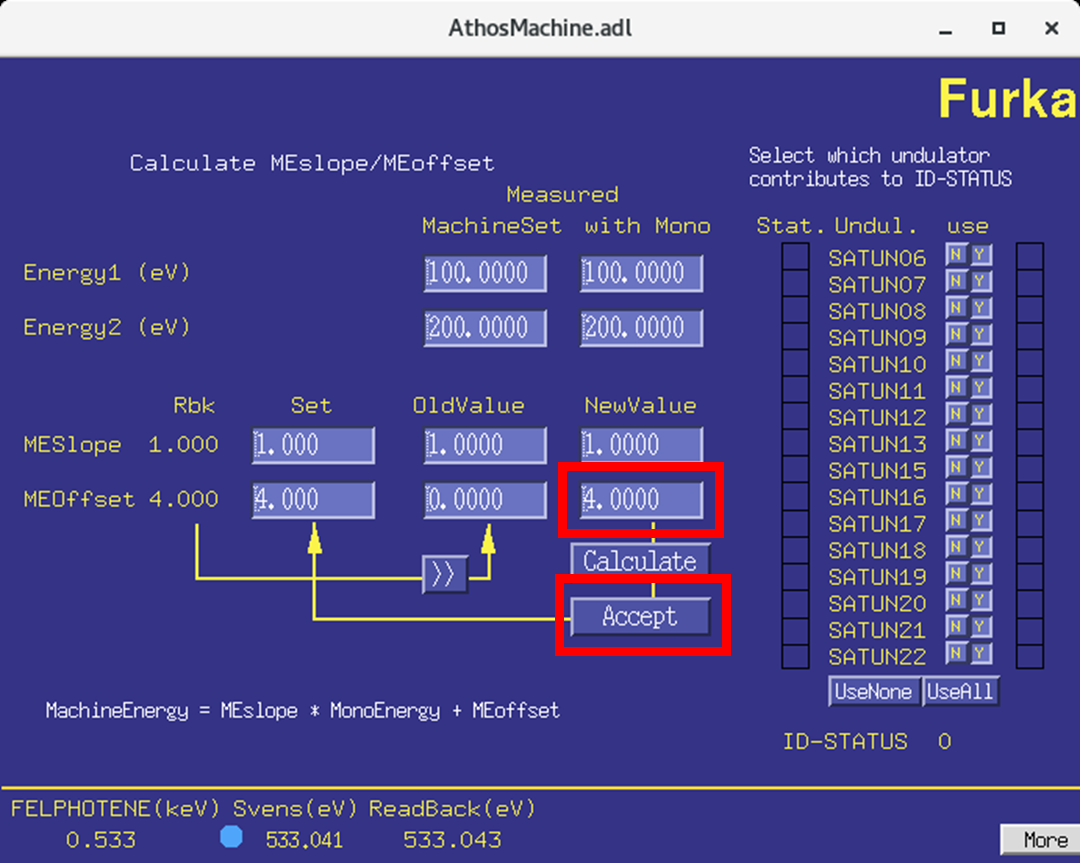
Change the "offset" number. This number should be difference between the "machine energy" and "photon energy" (e.g. 533 eV - 529 eV = + 4 eV) (as shown in the calculation). Change the number under "new value", click "accept". The number on the left of the panel should update to the new number.
Then you should verify that the offset is correct. To do this first go back to coupled mode
Then change the photon energy. The same change should happen for the "Photon energy" and for the "Machine energy". In the PMOS the gap in the spectrum should stay in the middle.
When done, move the screen for the PMOS out by choosing "out" in the drop-down list.
