Hans-Nikolai Viessmann
bde174b726
Hans-Nikolai Viessmann
bde174b726

refactor CSCS and Meg content

add merlin6 quick start

update merlin6 nomachine docs

give the userdoc its own color scheme

we use the Materials default one

refactored slurm general docs merlin6

add merlin6 JB docs

add software support m6 docs

add all files to nav

vibed changes #1

add missing pages

further vibing #2

vibe #3

further fixes
1.6 KiB
Connecting from a Windows Client
SSH with PuTTY without X11 Forwarding
PuTTY is one of the most common tools for SSH.
Check, if the following software packages are installed on the Windows workstation by inspecting the Start menu (hint: use the Search box to save time):
- PuTTY (should be already installed)
- [Optional] Xming (needed for SSH with X11 Forwarding)
If they are missing, you can install them using the Software Kiosk icon on the Desktop.
-
Start PuTTY
-
[Optional] Enable
xtermto have similar mouse behavour as in Linux: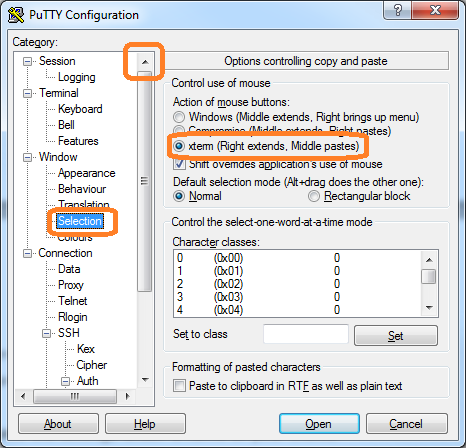
-
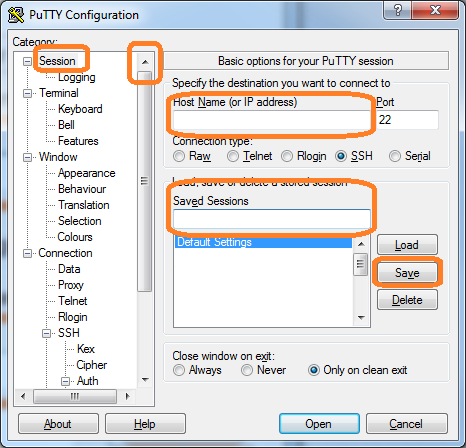
Create session to a Merlin login node and Open:


SSH with PuTTY with X11 Forwarding
Official X11 Forwarding support is through NoMachine. Please follow the document {Job Submission -> Interactive Jobs} and {Accessing Merlin -> NoMachine} for more details. However, we provide a small recipe for enabling X11 Forwarding in Windows.
Check, if the Xming is installed on the Windows workstation by inspecting the Start menu (hint: use the Search box to save time). If missing, you can install it by using the Software Kiosk icon (should be located on the Desktop).
-
Ensure that a X server (Xming) is running. Otherwise, start it.
-
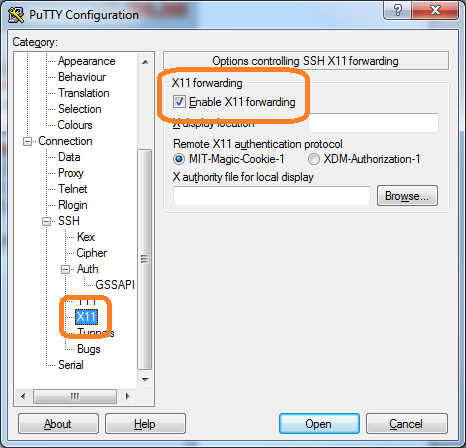
Enable X11 Forwarding in your SSH client. In example, for Putty: