Dialog for creating PLOT blocks in msr files. More...
#include <PGetPlotBlockDialog.h>

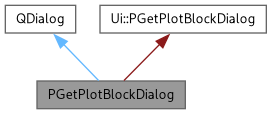
Public Slots | |
| void | addPlot () |
| Validates and adds a plot specification to the PLOT block. | |
| void | helpContent () |
| Opens the online help for PLOT blocks. | |
Public Member Functions | |
| PGetPlotBlockDialog (const QString helpUrl) | |
| Constructs the PLOT block dialog. | |
| QString | getPlotBlock () |
| Returns all entered plot specifications as formatted text. | |
Protected Member Functions | |
| bool | eventFilter (QObject *obj, QEvent *ev) |
| Event filter to handle keyboard shortcuts. | |
Private Attributes | |
| QString | fHelpUrl |
| URL to the online documentation for PLOT blocks. | |
Detailed Description
Dialog for creating PLOT blocks in msr files.
This dialog allows users to define plot specifications for visualizing musrfit data. Multiple plots can be added, each with its own type, run selection, and axis ranges. The dialog supports keyboard shortcuts for rapid plot entry.
- Plot Types:
Type Code Description Single Histo 0 Single histogram plot Asymmetry 2 Asymmetry plot MuMinus 4 Mu minus plot NonMusr 8 Non-muSR data plot
- Plot Parameters:
- Type: Plot type (Single Histo, Asymmetry, MuMinus, NonMusr)
- Runs: Space-separated list of run numbers to include
- X-Range: Time or x-axis range (both values required)
- Y-Range: Asymmetry or y-axis range (optional, both or neither)
- Generated Output Format:
- The dialog generates properly formatted PLOT blocks: ###############################################################PLOT 2 (asymmetry plot)runs 1 2 3range 0.0 10.0 -0.3 0.3PLOT 0 (single histo plot)runs 1range 0.0 10.0
- User Interaction:
- Press Return/Enter key to quickly add plots
- Input fields are cleared after each plot addition
- Focus returns to the Run List field for rapid entry
- See also
- PGetFourierBlockDialog For Fourier transform visualization settings
Definition at line 96 of file PGetPlotBlockDialog.h.
Constructor & Destructor Documentation
◆ PGetPlotBlockDialog()
| PGetPlotBlockDialog::PGetPlotBlockDialog | ( | const QString | helpUrl | ) |
Constructs the PLOT block dialog.
Initializes the dialog UI, sets up input validators for numeric range fields, and installs an event filter to capture keyboard shortcuts. The dialog is created as modal. A monospace font (Courier, 10pt) is used for the plot display to ensure proper column alignment.
- Input Validators:
- Double validators: X-range lower/upper, Y-range lower/upper
- Event Filter:
- An event filter is installed to intercept the Return key, allowing users to quickly add plots by pressing Enter instead of clicking the Add button.
- Parameters
-
helpUrl URL to the online documentation for PLOT blocks.
Definition at line 72 of file PGetPlotBlockDialog.cpp.
Member Function Documentation
◆ addPlot
|
slot |
Validates and adds a plot specification to the PLOT block.
Extracts values from all input fields, validates required fields, formats the plot block with proper column alignment, and appends it to the plot text display. After successful addition, the input fields are cleared and focus returns to the Run List field for the next plot.
- Validation Rules:
- Lower X-range (time) is required
- Upper X-range (time) is required
- Y-range is optional, but if provided, both lower and upper must be specified
- Plot Type Codes:
- "Single Histo" → 0
- "Asymmetry" → 2
- "MuMinus" → 4
- "NonMusr" → 8
- Generated Format:
- PLOT <type_code> (<type description>)runs <run_list>range <x_low> <x_high> [<y_low> <y_high>]
- Note
- The separator line (###...) is only added for the first plot block.
Definition at line 118 of file PGetPlotBlockDialog.cpp.
◆ eventFilter()
|
protected |
Event filter to handle keyboard shortcuts.
Event filter to intercept keyboard events.
Intercepts the Return key to trigger plot addition, allowing for rapid plot entry without clicking the Add button.
- Parameters
-
obj The object that generated the event. ev The event to be filtered.
- Returns
- true if the event was handled (Return key), false otherwise.
Filters keyboard events to intercept the Return/Enter key press. When Return is pressed, the current plot values are validated and added to the plot list via addPlot(). This allows for rapid plot entry without using the mouse to click the Add button.
- Parameters
-
obj Pointer to the object that generated the event. ev Pointer to the event to be filtered.
- Returns
- true if the event was handled (Return key was pressed and plot was added), false otherwise (event is passed to the base class).
Definition at line 240 of file PGetPlotBlockDialog.cpp.
◆ getPlotBlock()
|
inline |
Returns all entered plot specifications as formatted text.
- Returns
- Complete PLOT block content ready for insertion into an msr file.
Definition at line 107 of file PGetPlotBlockDialog.h.
◆ helpContent
|
slot |
Opens the online help for PLOT blocks.
Opens the online help documentation for PLOT blocks.
Attempts to open the help URL in the system's default web browser using QDesktopServices. If the URL is empty, displays an informational message. If the browser fails to open, displays an error message with a clickable link.
Definition at line 212 of file PGetPlotBlockDialog.cpp.
Member Data Documentation
◆ fHelpUrl
|
private |
URL to the online documentation for PLOT blocks.
Definition at line 132 of file PGetPlotBlockDialog.h.
The documentation for this class was generated from the following files:
- /workspace/LMU/musrfit/src/musredit_qt6/musredit/PGetPlotBlockDialog.h
- /workspace/LMU/musrfit/src/musredit_qt6/musredit/PGetPlotBlockDialog.cpp
Generated by
 1.13.2