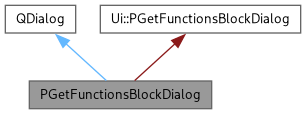
Dialog for creating FUNCTIONS blocks in msr files. More...
#include <PGetFunctionsBlockDialog.h>

Public Member Functions | |
| PGetFunctionsBlockDialog (const QString helpUrl="") | |
| Constructs the FUNCTIONS block dialog. | |
| QString | getFunctionsBlock () |
| Returns the complete FUNCTIONS block text. | |
Private Slots | |
| void | addFunction () |
| Validates and adds a function to the FUNCTIONS block. | |
| void | helpContent () |
| Opens the online help for FUNCTIONS blocks. | |
Private Attributes | |
| QString | fHelpUrl |
| URL to the online documentation for FUNCTIONS blocks. | |
Detailed Description
Dialog for creating FUNCTIONS blocks in msr files.
This dialog allows users to define mathematical functions that combine fit parameters. Functions are used in musrfit to create derived quantities from the basic fit parameters, enabling complex relationships between parameters without modifying the theory function.
- Function Syntax:
- Functions follow the format "funX = expression" where:
- X is a positive integer (function number)
- expression can contain: parN (parameters), mapN (mapped parameters), mathematical operators (+, -, *, /), and standard functions (cos, sin, exp, etc.)
- Validation Rules:
- The dialog performs basic syntax validation:
- Function must start with "fun" prefix
- Function must contain "funX =" format where X is a number
- A function definition cannot reference other functions (no "funN" in expression)
- Example Functions:
- FUNCTIONSfun1 = par1 * cos(par2 * 0.017453)fun2 = par3 + par4fun3 = map1 * par5
- Note
- The validation is basic and does not perform full syntax/semantic checking. Complex expressions should be verified by running musrfit.
- See also
- PGetParameterBlockDialog For defining fit parameters used in functions
Definition at line 87 of file PGetFunctionsBlockDialog.h.
Constructor & Destructor Documentation
◆ PGetFunctionsBlockDialog()
| PGetFunctionsBlockDialog::PGetFunctionsBlockDialog | ( | const QString | helpUrl = "" | ) |
Constructs the FUNCTIONS block dialog.
Initializes the dialog UI and sets focus to the function input field. The dialog is created as modal.
- Parameters
-
helpUrl URL to the online documentation for FUNCTIONS blocks. Defaults to empty string if not provided.
Definition at line 65 of file PGetFunctionsBlockDialog.cpp.
Member Function Documentation
◆ addFunction
|
privateslot |
Validates and adds a function to the FUNCTIONS block.
Validates and adds a function definition to the FUNCTIONS block.
Performs basic syntax checking before adding the function to the text display.
Performs basic syntax validation on the user's input before adding it to the FUNCTIONS block text area. This is a primitive validation that checks for common errors but is not a complete syntax/semantic checker.
- Validation Steps:
- Checks that input is not empty
- Verifies the function starts with "fun" prefix
- Uses regex to confirm "funX =" format where X is a positive number
- Ensures no function references appear in the expression (functions cannot reference other functions in musrfit)
- Error Handling:
- If validation fails, an error dialog is displayed describing the problem and the function is not added. The input field is preserved so the user can correct the error.
- Note
- On successful validation, the function is appended to the text display and the input field is cleared for the next entry.
Definition at line 97 of file PGetFunctionsBlockDialog.cpp.
◆ getFunctionsBlock()
|
inline |
Returns the complete FUNCTIONS block text.
- Returns
- All function definitions entered by the user, ready for insertion into an msr file.
Definition at line 99 of file PGetFunctionsBlockDialog.h.
◆ helpContent
|
privateslot |
Opens the online help for FUNCTIONS blocks.
Opens the online help documentation for FUNCTIONS blocks.
Attempts to open the help URL in the system's default web browser using QDesktopServices. If the URL is empty, displays an informational message. If the browser fails to open, displays an error message with a clickable link.
Definition at line 145 of file PGetFunctionsBlockDialog.cpp.
Member Data Documentation
◆ fHelpUrl
|
private |
URL to the online documentation for FUNCTIONS blocks.
Definition at line 115 of file PGetFunctionsBlockDialog.h.
The documentation for this class was generated from the following files:
- /workspace/LMU/musrfit/src/musredit_qt6/musredit/PGetFunctionsBlockDialog.h
- /workspace/LMU/musrfit/src/musredit_qt6/musredit/PGetFunctionsBlockDialog.cpp
Generated by
 1.13.2