# Monitoring
## Slurm Monitoring
### Job status
The status of submitted jobs can be check with the ``squeue`` command:
```bash
squeue -u $username
```
Common statuses:
* **merlin-\***: Running on the specified host
* **(Priority)**: Waiting in the queue
* **(Resources)**: At the head of the queue, waiting for machines to become available
* **(AssocGrpCpuLimit), (AssocGrpNodeLimit)**: Job would exceed per-user limitations on
the number of simultaneous CPUs/Nodes. Use `scancel` to remove the job and
resubmit with fewer resources, or else wait for your other jobs to finish.
* **(PartitionNodeLimit)**: Exceeds all resources available on this partition.
Run `scancel` and resubmit to a different partition (`-p`) or with fewer
resources.
Check in the **man** pages (`man squeue`) for all possible options for this command.
??? note "Using 'squeue' example"
```console
# squeue -u feichtinger
JOBID PARTITION NAME USER ST TIME NODES NODELIST(REASON)
134332544 general spawner- feichtin R 5-06:47:45 1 merlin-c-204
134321376 general subm-tal feichtin R 5-22:27:59 1 merlin-c-204
```
### Partition status
The status of the nodes and partitions (a.k.a. queues) can be seen with the `sinfo` command:
```bash
sinfo
```
Check in the **man** pages (`man sinfo`) for all possible options for this command.
??? note "Using 'sinfo' example"
```console
# sinfo -l
Thu Jan 23 16:34:49 2020
PARTITION AVAIL TIMELIMIT JOB_SIZE ROOT OVERSUBS GROUPS NODES STATE NODELIST
test up 1-00:00:00 1-infinite no NO all 3 mixed merlin-c-[024,223-224]
test up 1-00:00:00 1-infinite no NO all 2 allocated merlin-c-[123-124]
test up 1-00:00:00 1-infinite no NO all 1 idle merlin-c-023
general* up 7-00:00:00 1-50 no NO all 6 mixed merlin-c-[007,204,207-209,219]
general* up 7-00:00:00 1-50 no NO all 57 allocated merlin-c-[001-005,008-020,101-122,201-203,205-206,210-218,220-222]
general* up 7-00:00:00 1-50 no NO all 3 idle merlin-c-[006,021-022]
daily up 1-00:00:00 1-60 no NO all 9 mixed merlin-c-[007,024,204,207-209,219,223-224]
daily up 1-00:00:00 1-60 no NO all 59 allocated merlin-c-[001-005,008-020,101-124,201-203,205-206,210-218,220-222]
daily up 1-00:00:00 1-60 no NO all 4 idle merlin-c-[006,021-023]
hourly up 1:00:00 1-infinite no NO all 9 mixed merlin-c-[007,024,204,207-209,219,223-224]
hourly up 1:00:00 1-infinite no NO all 59 allocated merlin-c-[001-005,008-020,101-124,201-203,205-206,210-218,220-222]
hourly up 1:00:00 1-infinite no NO all 4 idle merlin-c-[006,021-023]
gpu up 7-00:00:00 1-infinite no NO all 1 mixed merlin-g-007
gpu up 7-00:00:00 1-infinite no NO all 8 allocated merlin-g-[001-006,008-009]
```
### Slurm commander
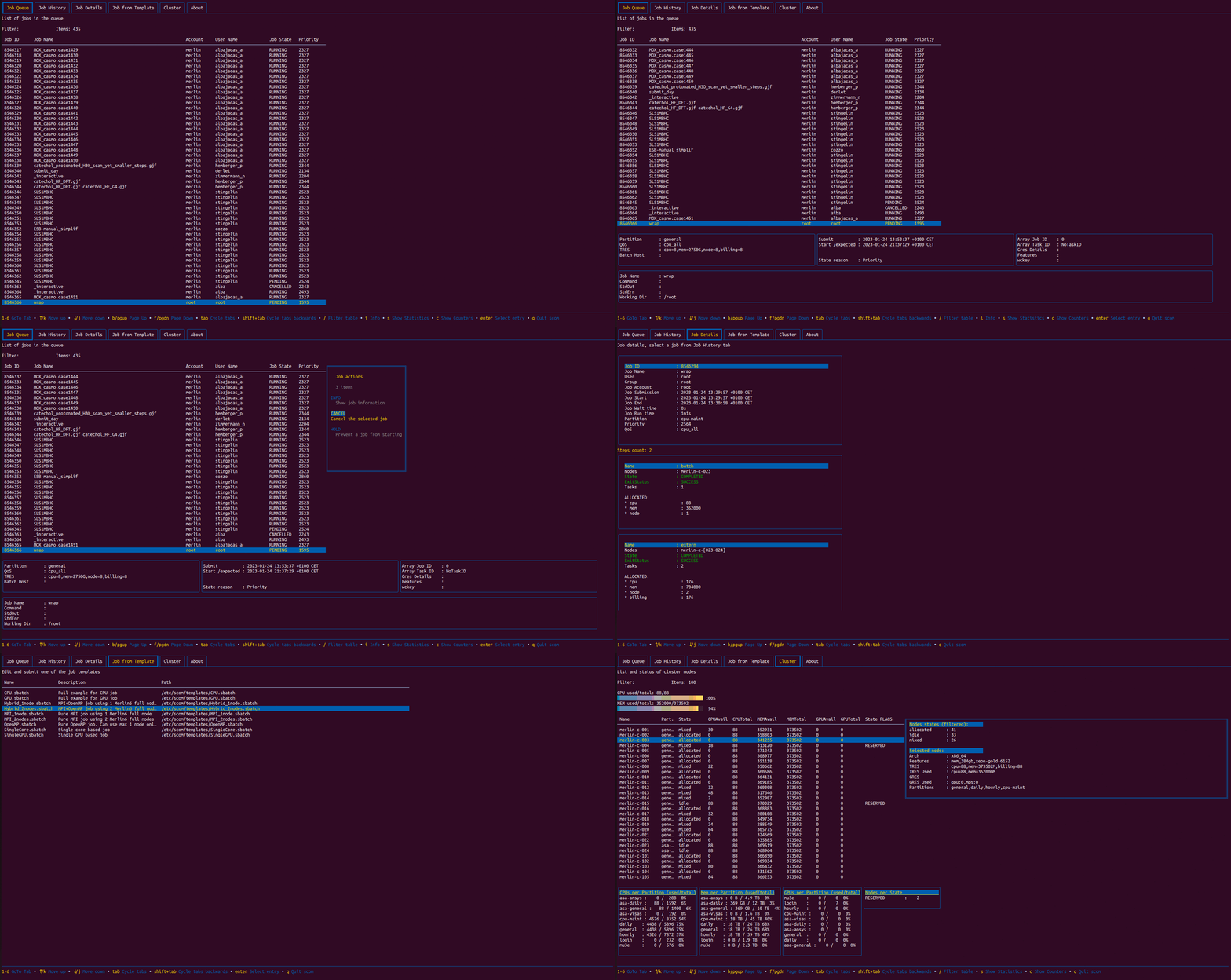
The **[Slurm Commander (scom)](https://github.com/CLIP-HPC/SlurmCommander/)** is a simple but very useful open source text-based user interface for
simple and efficient interaction with Slurm. It is developed by the **CLoud Infrastructure Project (CLIP-HPC)** and external contributions. To use it, one can
simply run the following command:
```bash
scom # merlin6 cluster
SLURM_CLUSTERS=merlin5 scom # merlin5 cluster
SLURM_CLUSTERS=gmerlin6 scom # gmerlin6 cluster
scom -h # Help and extra options
scom -d 14 # Set Job History to 14 days (instead of default 7)
```
With this simple interface, users can interact with their jobs, as well as getting information about past and present jobs:
* Filtering jobs by substring is possible with the `/` key.
* Users can perform multiple actions on their jobs (such like cancelling,
holding or requeing a job), SSH to a node with an already running job,
or getting extended details and statistics of the job itself.
Also, users can check the status of the cluster, to get statistics and node usage information as well as getting information about node properties.
The interface also provides a few job templates for different use cases (i.e. MPI, OpenMP, Hybrid, single core). Users can modify these templates,
save it locally to the current directory, and submit the job to the cluster.
!!! note
Currently, `scom` does not provide live updated information for the [Job History] tab. To update Job History
information, users have to exit the application with the q key. Other tabs will be updated every 5
seconds (default). On the other hand, the [Job
History] tab contains only information for the **merlin6** CPU cluster
only. Future updates will provide information for other clusters.
For further information about how to use **scom**, please refer to the **[Slurm Commander Project webpage](https://github.com/CLIP-HPC/SlurmCommander/)**
### Job accounting
Users can check detailed information of jobs (pending, running, completed, failed, etc.) with the `sacct` command.
This command is very flexible and can provide a lot of information. For checking all the available options, please read `man sacct`.
Below, we summarize some examples that can be useful for the users:
```bash
# Today jobs, basic summary
sacct
# Today jobs, with details
sacct --long
# Jobs from January 1, 2022, 12pm, with details
sacct -S 2021-01-01T12:00:00 --long
# Specific job accounting
sacct --long -j $jobid
# Jobs custom details, without steps (-X)
sacct -X --format=User%20,JobID,Jobname,partition,state,time,submit,start,end,elapsed,AveRss,MaxRss,MaxRSSTask,MaxRSSNode%20,MaxVMSize,nnodes,ncpus,ntasks,reqcpus,totalcpu,reqmem,cluster,TimeLimit,TimeLimitRaw,cputime,nodelist%50,AllocTRES%80
# Jobs custom details, with steps
sacct --format=User%20,JobID,Jobname,partition,state,time,submit,start,end,elapsed,AveRss,MaxRss,MaxRSSTask,MaxRSSNode%20,MaxVMSize,nnodes,ncpus,ntasks,reqcpus,totalcpu,reqmem,cluster,TimeLimit,TimeLimitRaw,cputime,nodelist%50,AllocTRES%80
```
### Job efficiency
Users can check how efficient are their jobs. For that, the `seff` command is available.
```bash
seff $jobid
```
??? note "Using 'seff' example"
```console
# seff 134333893
Job ID: 134333893
Cluster: merlin6
User/Group: albajacas_a/unx-sls
State: COMPLETED (exit code 0)
Nodes: 1
Cores per node: 8
CPU Utilized: 00:26:15
CPU Efficiency: 49.47% of 00:53:04 core-walltime
Job Wall-clock time: 00:06:38
Memory Utilized: 60.73 MB
Memory Efficiency: 0.19% of 31.25 GB
```
### List job attributes
The ``sjstat`` command is used to display statistics of jobs under control of SLURM. To use it
```bash
sjstat
```
??? note "Using 'sjstat' example"
```console
# sjstat -v
Scheduling pool data:
----------------------------------------------------------------------------------
Total Usable Free Node Time Other
Pool Memory Cpus Nodes Nodes Nodes Limit Limit traits
----------------------------------------------------------------------------------
test 373502Mb 88 6 6 1 UNLIM 1-00:00:00
general* 373502Mb 88 66 66 8 50 7-00:00:00
daily 373502Mb 88 72 72 9 60 1-00:00:00
hourly 373502Mb 88 72 72 9 UNLIM 01:00:00
gpu 128000Mb 8 1 1 0 UNLIM 7-00:00:00
gpu 128000Mb 20 8 8 0 UNLIM 7-00:00:00
Running job data:
---------------------------------------------------------------------------------------------------
Time Time Time
JobID User Procs Pool Status Used Limit Started Master/Other
---------------------------------------------------------------------------------------------------
13433377 collu_g 1 gpu PD 0:00 24:00:00 N/A (Resources)
13433389 collu_g 20 gpu PD 0:00 24:00:00 N/A (Resources)
13433382 jaervine 4 gpu PD 0:00 24:00:00 N/A (Priority)
13433386 barret_d 20 gpu PD 0:00 24:00:00 N/A (Priority)
13433382 pamula_f 20 gpu PD 0:00 168:00:00 N/A (Priority)
13433387 pamula_f 4 gpu PD 0:00 24:00:00 N/A (Priority)
13433365 andreani 132 daily PD 0:00 24:00:00 N/A (Dependency)
13433388 marino_j 6 gpu R 1:43:12 168:00:00 01-23T14:54:57 merlin-g-007
13433377 choi_s 40 gpu R 2:09:55 48:00:00 01-23T14:28:14 merlin-g-006
13433373 qi_c 20 gpu R 7:00:04 24:00:00 01-23T09:38:05 merlin-g-004
13433390 jaervine 2 gpu R 5:18 24:00:00 01-23T16:32:51 merlin-g-007
13433390 jaervine 2 gpu R 15:18 24:00:00 01-23T16:22:51 merlin-g-007
13433375 bellotti 4 gpu R 7:35:44 9:00:00 01-23T09:02:25 merlin-g-001
13433358 bellotti 1 gpu R 1-05:52:19 144:00:00 01-22T10:45:50 merlin-g-007
13433377 lavriha_ 20 gpu R 5:13:24 24:00:00 01-23T11:24:45 merlin-g-008
13433370 lavriha_ 40 gpu R 22:43:09 24:00:00 01-22T17:55:00 merlin-g-003
13433373 qi_c 20 gpu R 15:03:15 24:00:00 01-23T01:34:54 merlin-g-002
13433371 qi_c 4 gpu R 22:14:14 168:00:00 01-22T18:23:55 merlin-g-001
13433254 feichtin 2 general R 5-07:26:11 156:00:00 01-18T09:11:58 merlin-c-204
13432137 feichtin 2 general R 5-23:06:25 160:00:00 01-17T17:31:44 merlin-c-204
13433389 albajaca 32 hourly R 41:19 1:00:00 01-23T15:56:50 merlin-c-219
13433387 riemann_ 2 general R 1:51:47 4:00:00 01-23T14:46:22 merlin-c-204
13433370 jimenez_ 2 general R 23:20:45 168:00:00 01-22T17:17:24 merlin-c-106
13433381 jimenez_ 2 general R 4:55:33 168:00:00 01-23T11:42:36 merlin-c-219
13433390 sayed_m 128 daily R 21:49 10:00:00 01-23T16:16:20 merlin-c-223
13433359 adelmann 2 general R 1-05:00:09 48:00:00 01-22T11:38:00 merlin-c-204
13433377 zimmerma 2 daily R 6:13:38 24:00:00 01-23T10:24:31 merlin-c-007
13433375 zohdirad 24 daily R 7:33:16 10:00:00 01-23T09:04:53 merlin-c-218
13433363 zimmerma 6 general R 1-02:54:20 47:50:00 01-22T13:43:49 merlin-c-106
13433376 zimmerma 6 general R 7:25:42 23:50:00 01-23T09:12:27 merlin-c-007
13433371 vazquez_ 16 daily R 21:46:31 23:59:00 01-22T18:51:38 merlin-c-106
13433382 vazquez_ 16 daily R 4:09:23 23:59:00 01-23T12:28:46 merlin-c-024
13433376 jiang_j1 440 daily R 7:11:14 10:00:00 01-23T09:26:55 merlin-c-123
13433376 jiang_j1 24 daily R 7:08:19 10:00:00 01-23T09:29:50 merlin-c-220
13433384 kranjcev 440 daily R 2:48:19 24:00:00 01-23T13:49:50 merlin-c-108
13433371 vazquez_ 16 general R 20:15:15 120:00:00 01-22T20:22:54 merlin-c-210
13433371 vazquez_ 16 general R 21:15:51 120:00:00 01-22T19:22:18 merlin-c-210
13433374 colonna_ 176 daily R 8:23:18 24:00:00 01-23T08:14:51 merlin-c-211
13433374 bures_l 88 daily R 10:45:06 24:00:00 01-23T05:53:03 merlin-c-001
13433375 derlet 88 daily R 7:32:05 24:00:00 01-23T09:06:04 merlin-c-107
13433373 derlet 88 daily R 17:21:57 24:00:00 01-22T23:16:12 merlin-c-002
13433373 derlet 88 daily R 18:13:05 24:00:00 01-22T22:25:04 merlin-c-112
13433365 andreani 264 daily R 4:10:08 24:00:00 01-23T12:28:01 merlin-c-003
13431187 mahrous_ 88 general R 6-15:59:16 168:00:00 01-17T00:38:53 merlin-c-111
13433387 kranjcev 2 general R 1:48:47 4:00:00 01-23T14:49:22 merlin-c-204
13433368 karalis_ 352 general R 1-00:05:22 96:00:00 01-22T16:32:47 merlin-c-013
13433367 karalis_ 352 general R 1-00:06:44 96:00:00 01-22T16:31:25 merlin-c-118
13433385 karalis_ 352 general R 1:37:24 96:00:00 01-23T15:00:45 merlin-c-213
13433374 sato 256 general R 14:55:55 24:00:00 01-23T01:42:14 merlin-c-204
13433374 sato 64 general R 10:43:35 24:00:00 01-23T05:54:34 merlin-c-106
67723568 sato 32 general R 10:40:07 24:00:00 01-23T05:58:02 merlin-c-007
13433265 khanppna 440 general R 3-18:20:58 168:00:00 01-19T22:17:11 merlin-c-008
13433375 khanppna 704 general R 7:31:24 24:00:00 01-23T09:06:45 merlin-c-101
13433371 khanppna 616 general R 21:40:33 24:00:00 01-22T18:57:36 merlin-c-208
```
### Graphical user interface
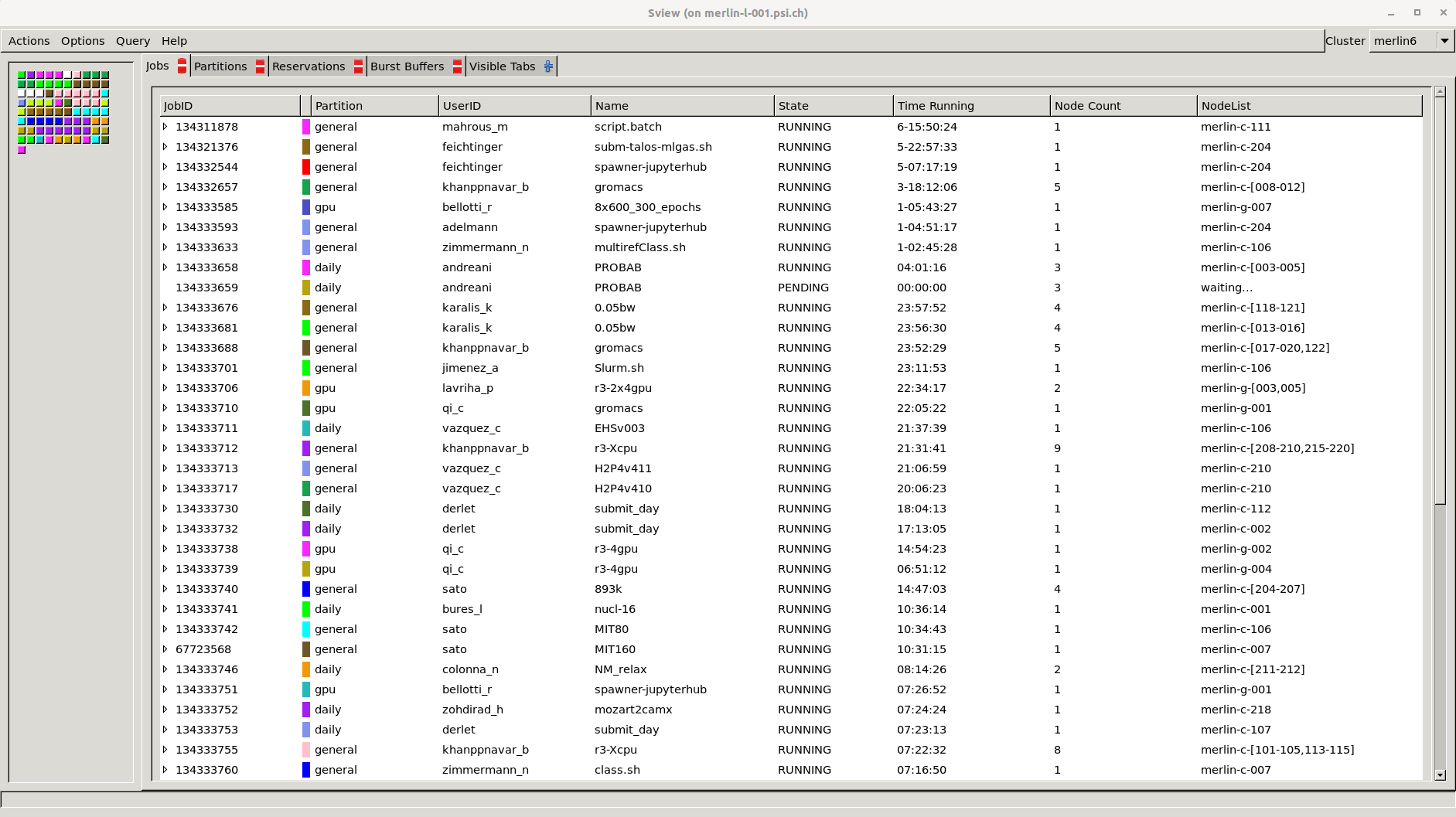
When using **ssh** with X11 forwarding (`ssh -XY`), or when using NoMachine, users can use `sview`.
**SView** is a graphical user interface to view and modify Slurm states. To run **sview**:
```bash
ssh -XY $username@merlin-l-001.psi.ch # Not necessary when using NoMachine
sview
```
## General Monitoring
The following pages contain basic monitoring for Slurm and computing nodes.
Currently, monitoring is based on Grafana + InfluxDB. In the future it will
be moved to a different service based on ElasticSearch + LogStash + Kibana.
In the meantime, the following monitoring pages are available in a best effort
support:
### Merlin6 Monitoring Pages
* Slurm monitoring:
* ***[Merlin6 Slurm Statistics - XDMOD](https://merlin-slurmmon01.psi.ch/)***
* [Merlin6 Slurm Live Status](https://hpc-monitor02.psi.ch/d/QNcbW1AZk/merlin6-slurm-live-status?orgId=1&refresh=10s)
* [Merlin6 Slurm Overview](https://hpc-monitor02.psi.ch/d/94UxWJ0Zz/merlin6-slurm-overview?orgId=1&refresh=10s)
* Nodes monitoring:
* [Merlin6 CPU Nodes Overview](https://hpc-monitor02.psi.ch/d/JmvLR8gZz/merlin6-computing-cpu-nodes?orgId=1&refresh=10s)
* [Merlin6 GPU Nodes Overview](https://hpc-monitor02.psi.ch/d/gOo1Z10Wk/merlin6-computing-gpu-nodes?orgId=1&refresh=10s)
### Merlin5 Monitoring Pages
* Slurm monitoring:
* [Merlin5 Slurm Live Status](https://hpc-monitor02.psi.ch/d/o8msZJ0Zz/merlin5-slurm-live-status?orgId=1&refresh=10s)
* [Merlin5 Slurm Overview](https://hpc-monitor02.psi.ch/d/eWLEW1AWz/merlin5-slurm-overview?orgId=1&refresh=10s)
* Nodes monitoring:
* [Merlin5 CPU Nodes Overview](https://hpc-monitor02.psi.ch/d/ejTyWJAWk/merlin5-computing-cpu-nodes?orgId=1&refresh=10s)